API, feeds & badges
Free, no key, CORS enabled. Please cache responses for at least a few minutes; the data only changes every few hours.
Machine-readable description: https://latestat.com/openapi.json (OpenAPI 3.1). Import it into Postman, Insomnia or Bruno, or feed it to a client generator or an AI assistant.
Jump to: stack check · alerts in Slack or Teams · calendar, RSS and CSV · badges.
In your terminal
Every product, branch and stack report answers in plain text when you use curl, wget, HTTPie or PowerShell:
curl latestat.com/php              # latest version and support dates
curl latestat.com/php?v=8.3.4      # am I up to date?
curl latestat.com/eol              # end of life in the next 90 days
curl "latestat.com/stack?s=php:8.3.4,ubuntu:22.04"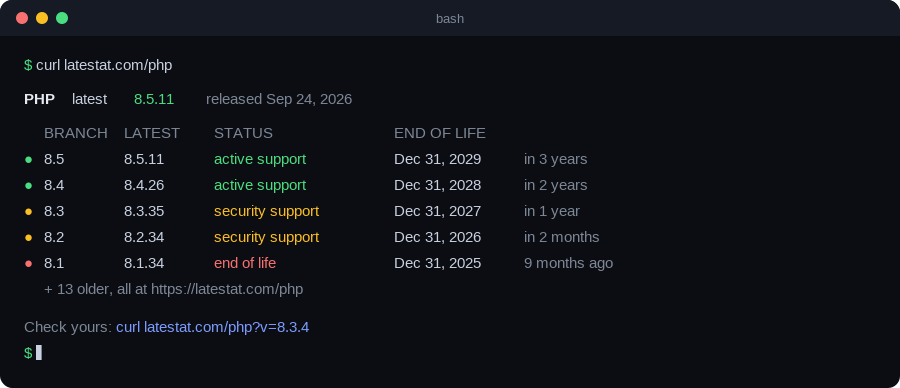
curl latestat.com/php prints (example output).Add ?nocolor for output without colors, or ?format=text to get the text version from any client.
On Windows: Command Prompt and PowerShell 7 run curl as is. In Windows PowerShell 5.1, curl is a shortcut for Invoke-WebRequest, so type curl.exe instead, or use irm latestat.com/php.
All products
GET https://latestat.com/api/products.jsonReturns every tracked product with its latest version and release date. Narrow it with ?cat=database or ?p=php,nodejs,postgresql.
latest is null for products that publish support dates but no version numbers (some operating systems, devices and cloud services). Those have "has_versions": false, so you can tell them apart from a missing value.
One product
GET https://latestat.com/api/php.jsonReturns the latest version plus every branch with its status (active, security, eol), support and end-of-life dates.
curl -s https://latestat.com/api/php.json | jq -r '.latest.version // "no version numbers"'Check a whole stack
GET https://latestat.com/api/stack.json?s=php:8.3.4,ubuntu:22.04,nginx:1.24.0The same report as Check my stack: a grade (A–F), counts, and one item per line, most urgent first. Each item has a state
(current, behind, eol, …), the branch status (active, security, eol),
the end-of-life date, ending (support ends within 6 months) and a plain-English message that says what to do.
GitHub Action
Fail a build when anything in your stack reaches end of life, and get warned a few months ahead. Add one step to any workflow:
- uses: MaskUp/eol-check-action@v1
  with:
    stack: php:8.3, nodejs:22, ubuntu:24.04
    warn-days: 90
Inputs, outputs and a weekly-check example: MaskUp/eol-check-action.
Statistics
- Software end-of-life statistics (counts per year, support windows, longest support):
https://latestat.com/api/stats.json, shown on /stats - WordPress sites by PHP version and support status, with monthly history:
https://latestat.com/api/stats/wordpress-php.jsonand CSV - Every end-of-life date in a year as a spreadsheet:
https://latestat.com/eol/2027.csv(business IT; add?all=1for everything) - Upcoming end-of-life dates as CSV:
https://latestat.com/eol.csv, with the calendar's filters:?days=30|90|180|365,&cat=database,&scope=popular,&q=php. The same filters work on/eol.ics. - A stack report as CSV:
https://latestat.com/stack.csv?s=php:8.3.4,ubuntu:22.04
Ready-made scripts
The latest@ repo on GitHub has copy-paste examples that check your stack and exit with an error when something has reached end of life: a GitHub Actions workflow that fails the build and re-checks every week, plus Bash, PowerShell, Python and JavaScript versions.
RSS feeds
- Every new release:
https://latestat.com/feed.xml - One product:
https://latestat.com/php/feed.xml - Alerts for your stack (new versions in your branches, newer branches, security-fixes-only, 6 months and 30 days before end of life, end of life):
https://latestat.com/stack/feed.xml?s=php:8.3.4,ubuntu:22.04. Every stack report links its own feed. Slack:/feed subscribeplus the link.
Alerts in Slack or Microsoft Teams
Slack, no code: install Slack's RSS app, then in the channel type /feed subscribe followed by a feed link:
your stack report's alerts feed (https://latestat.com/stack/feed.xml?s=…, on every report), a category's feed or /eol.xml.
New items show up as messages.
Slack or Teams, with a weekly script: the scripts below check your stack and post only what needs attention: anything past end of life, ending within 6 months, or on security fixes only. Nothing is posted when everything is fine.
- Get a webhook URL. Teams: on the channel, choose Workflows and the Send webhook alerts to a channel template, then copy its URL (the old Office 365 "Incoming Webhook" connector is being retired). Slack: create an app with an Incoming Webhook for the channel.
- Put your stack and the URL at the top of the script. The script picks the right message format from the URL.
- Run it once a week:
0 8 * * 1 /opt/scripts/eol-alert.shin cron, or on Windowsschtasks /create /tn "EOL alert" /sc weekly /d MON /st 08:00 /tr "powershell -NoProfile -File C:\scripts\Send-EolAlert.ps1".
Bash (needs curl and jq)
#!/usr/bin/env bash
# Post a weekly end-of-life alert to Slack or Microsoft Teams. Needs curl and jq.
STACK="php:8.3.4,ubuntu:22.04,nginx:1.24.0,nodejs:20.11.0"
WEBHOOK="https://hooks.slack.com/services/XXX/YYY/ZZZ"   # or your Teams workflow URL
API="${API:-https://latestat.com}"

report=$(curl -fsS "$API/api/stack.json?s=$STACK") || exit 1
# Only what needs attention: past end of life, ending within 6 months, or on security fixes only.
due=$(jq -r '.items[] | select(.state == "eol" or .ending or .status == "security") | "• \(.input): \(.message)"' <<<"$report")
[ -z "$due" ] && exit 0
title="Stack grade $(jq -r .grade <<<"$report"): $(jq -r .url <<<"$report")"

if [[ "$WEBHOOK" == *hooks.slack.com* ]]; then
  body=$(jq -n --arg t "$title"$'\n'"$due" '{text: $t}')
else  # Teams: an Adaptive Card, one line per item
  body=$(jq -n --arg title "$title" --arg due "$due" '{type: "message", attachments: [{contentType: "application/vnd.microsoft.card.adaptive",
    content: {"$schema": "http://adaptivecards.io/schemas/adaptive-card.json", type: "AdaptiveCard", version: "1.4",
      body: ([{type: "TextBlock", text: $title, weight: "Bolder", wrap: true}] + ($due | split("\n") | map({type: "TextBlock", text: ., wrap: true})))}}]}')
fi
curl -fsS -X POST -H 'Content-Type: application/json' -d "$body" "$WEBHOOK" >/dev/null
PowerShell (Windows PowerShell 5.1 or PowerShell 7)
# Post a weekly end-of-life alert to Microsoft Teams or Slack. Windows PowerShell 5.1 or PowerShell 7.
$Stack   = 'php:8.3.4,ubuntu:22.04,windows-server:2016,sql-server:2019'
$Webhook = 'https://...'   # Teams workflow URL, or a Slack incoming webhook
$Api     = if ($env:LATESTAT_API) { $env:LATESTAT_API } else { 'https://latestat.com' }

$report = Invoke-RestMethod "$Api/api/stack.json?s=$Stack"
# Only what needs attention: past end of life, ending within 6 months, or on security fixes only.
$due = @($report.items | Where-Object { $_.state -eq 'eol' -or $_.ending -or $_.status -eq 'security' })
if ($due.Count -eq 0) { return }
$title = "Stack grade $($report.grade): $($report.url)"
$lines = $due | ForEach-Object { "- $($_.input): $($_.message)" }

if ($Webhook -like '*hooks.slack.com*') {
    $body = @{ text = $title + "`n" + ($lines -join "`n") }
} else {  # Teams: an Adaptive Card, one line per item
    $blocks = @(@{ type = 'TextBlock'; text = $title; weight = 'Bolder'; wrap = $true }) + @($lines | ForEach-Object { @{ type = 'TextBlock'; text = $_; wrap = $true } })
    $body = @{ type = 'message'; attachments = @(@{ contentType = 'application/vnd.microsoft.card.adaptive'; content = @{
        '$schema' = 'http://adaptivecards.io/schemas/adaptive-card.json'; type = 'AdaptiveCard'; version = '1.4'; body = $blocks } }) }
}
$json = $body | ConvertTo-Json -Depth 10
Invoke-RestMethod -Method Post -Uri $Webhook -ContentType 'application/json; charset=utf-8' -Body ([Text.Encoding]::UTF8.GetBytes($json)) | Out-Null
The GitHub Action above can do the same from a repository's scheduled workflow, and fails the run instead of posting.
Calendar, RSS and CSV for any list
Every list on the site has the same three formats. The calendar has end-of-life dates, the RSS feed has new releases plus end-of-life milestones (reached end of life, 30 days to go, moved to security fixes only), and the CSV is the table on the page.
| List | Calendar | RSS | CSV |
|---|---|---|---|
| A category | /category/databases.ics | /category/databases/feed.xml | /category/databases.csv |
| A ready-made list | /homelab.ics | /homelab/feed.xml | /homelab.csv |
| The end-of-life calendar | /eol.ics | /eol.xml (milestones only) | /eol.csv |
| Your own list | /eol.ics?p=php,nodejs | /eol.xml?p=php,nodejs | /products.csv?p=php,nodejs |
| One product | /php/eol.ics | /php/feed.xml (releases) | /php.csv (every branch) |
| A stack report | /stack.ics?s=… | /stack/feed.xml?s=… | /stack.csv?s=… |
| Everything | /eol.ics | /feed.xml (releases) | /products.csv |
The calendar's filters work on all three: ?cat=database, &scope=popular, &q=php, &p=php,nodejs.
/api/products.json takes ?cat= and ?p= too.
Badges

[](https://latestat.com/php)HTML version:
<a href="https://latestat.com/php"><img src="https://latestat.com/badge/php.svg" alt="PHP latest version"></a>Add ?cycle= to pin a branch. It turns red when that branch is end of life:
https://latestat.com/badge/php.svg?cycle=8.1